

Welcome to Overcharts trading platform!
To start analyzing and trading markets in a few minutes, please follow these steps:
Download Setup #
To download the setup, we recommend using Google Chrome or Firefox. DO NOT use Microsoft Edge. Microsoft Edge makes the download process more complicated due to excessive protections and checks.
Download Overcharts setup from this link: DOWNLOAD
If you are using Microsoft Edge (not recommended), follow these steps:
1) Start the setup download.
2) If the file downloads without further warnings, proceed with the installation. If a warning appears in the downloads section: select the file, click the three dots on the right, then click Keep.
3) In the window that opens, click Show More, then click Keep Anyway.
4) Proceed with the installation.
Install Overcharts #
Install Overcharts by double-clicking the setup file or running it directly from your browser.
If Windows shows this message after starting the setup:
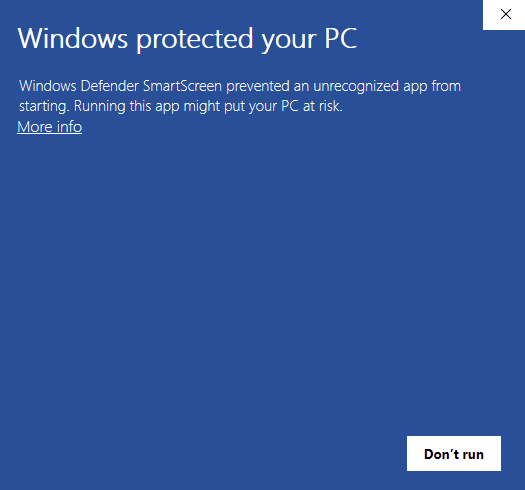
Click More Info and then press Run Anyway.
‘Smart App Control’ blocking the installation #
On some systems, the Overcharts installer may be blocked by Windows ‘Smart App Control’.
If this happens, you must disable ‘Smart App Control’ in order to proceed with the installation. There is no alternative workaround.
To disable ‘Smart App Control’:
- Open Windows Settings
- Go to Privacy & Security
- Click on Windows Security
- Open App & browser control
- Select Smart App Control
- Set it to Off
- Restart your computer if required
Once ‘Smart App Control’ is disabled, you can run the Overcharts setup again and complete the installation normally.
Warnings:
If, while downloading or installing Overcharts, you receive a warning about an unknown author or a potentially dangerous file, proceed with the installation anyway. The file downloaded from our website is 100% safe. If, after downloading, you run the setup directly from your browser, but the installation does not complete successfully
1) Copy the setup file to your desktop or another folder.
2) Temporarily disable your antivirus
3) Proceed with the installation
* Some free antivirus (for example, Avast) may incorrectly block the installation.


